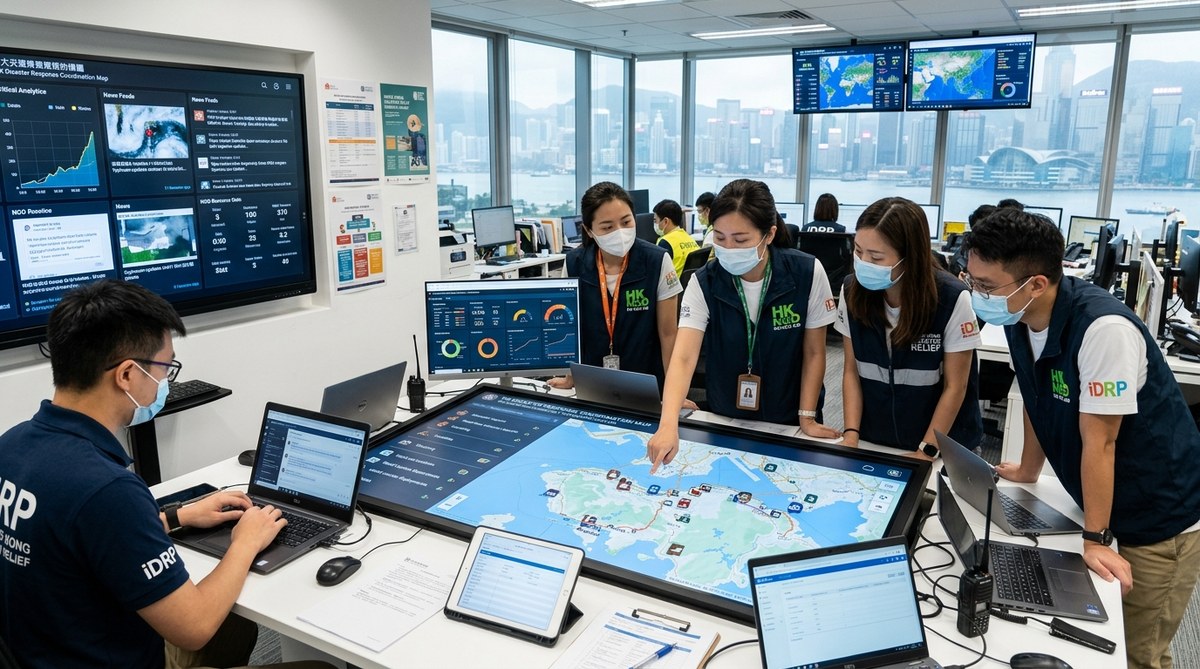
When a typhoon warning signal rises to T8 in Hong Kong, your phone buzzes. You check the NGO group chat. Someone shares a live map of flooded areas in Sai Kung. Another person posts a spreadsheet of shelter capacities across the New Territories. Within minutes, your team knows where to send supplies and who is available to help.
That is the power of digital tools in disaster response. For Hong Kong NGOs, the difference between chaos and coordinated action often comes down to the technology you have in place before the crisis hits. Whether you are dealing with a super typhoon, a flash flood in a hillside village, or a building collapse, the right digital systems can save hours and lives.
Hong Kong NGOs can improve disaster coordination by combining three digital pillars: real time mapping for situational awareness, dedicated communication platforms for team and inter agency chat, and lightweight data management systems to track aid distribution. Start with free or low cost tools, test them during drills, and build a shared protocol across partner organisations before the next crisis hits.
Why Hong Kong needs digital ready NGOs
Hong Kong faces specific disaster risks. Typhoons are seasonal. Heavy rain can trigger landslides in areas like Shek Kip Mei or the hills above Wong Tai Sin. A dense urban population means that a power outage or transport shutdown affects thousands of people fast.
The government response is strong, but NGOs fill critical gaps. You deliver food to elderly residents in subdivided flats. You provide temporary shelter for families displaced by flooding. You coordinate volunteer teams when the MTR stops running.
Without digital tools, your team relies on phone trees, paper lists, and word of mouth. That worked in the past, but it is slow. In 2026, your NGO can use technology that is affordable, easy to learn, and designed for exactly this work.
The three core digital pillars for disaster coordination
Think of your digital toolkit as three interconnected layers. Each one solves a specific coordination problem.
1. Real time mapping and situational awareness
You need to know what is happening on the ground. Where are the flooded roads? Which shelters are full? Where are vulnerable communities located?
Free tools like Google Maps can be customised with layers. You can mark shelter locations, road closures, and supply drop points. For more advanced work, platforms like Ushahidi or the open source tool OpenStreetMap let you crowdsource information from volunteers in the field.
A practical example from 2025: during a severe rainstorm in Lantau, a local NGO used a shared Google My Map to track road blockages. Volunteers updated it from their phones. The coordination team rerouted food delivery vans in real time. That saved three hours of wasted driving.
2. Dedicated communication platforms
WhatsApp groups are useful, but they get chaotic. Messages scroll away. Important updates get buried under photos of flooded streets.
Consider using a platform like Slack, Microsoft Teams, or the free version of Zulip. These tools let you create separate channels for different topics: one for transport updates, one for volunteer check ins, one for supply requests. You can pin critical messages. You can search past conversations to find the contact number for a specific district leader.
For inter agency coordination, a shared Signal group or a Telegram broadcast channel can connect multiple NGOs without cluttering everyone’s personal inbox.
3. Lightweight data management systems
During a disaster, you track many things: how many blankets you distributed, which families received food packs, where volunteers are stationed, and what supplies are running low.
A full scale database might be overkill. Instead, use a tool like Airtable, Google Sheets with forms, or the free tier of Kobo Toolbox. These systems let you collect data from the field using a mobile phone and see it update on a dashboard instantly.
One Hong Kong NGO that serves elderly residents in Sham Shui Po uses a simple Google Form linked to a Sheet. Volunteers log each delivery. The coordinator can see at a glance which buildings have been covered and which streets still need support.
A practical process to set up your digital response system
Here is a numbered sequence your team can follow this month.
-
Audit your current tools. List every platform your team uses during a crisis. Note what works and what causes delays. Be honest about gaps. If your team still prints paper sign in sheets for volunteers, that is a gap.
-
Choose one tool per pillar. Do not try to adopt ten tools at once. Pick one mapping tool, one communication platform, and one data system. Start with free versions.
-
Run a tabletop exercise. Gather your team for a two hour drill. Simulate a typhoon scenario. Use your new tools to coordinate a response. Identify confusion points and fix them.
-
Create a simple protocol document. Write down the steps. Which tool do you use for what? Who has admin access? What is the backup plan if the internet goes down? Keep it to one page.
-
Train your volunteers. Run a 30 minute session showing volunteers how to update a map or fill in a form. Practice during a low stress month, not during a real emergency.
-
Test inter agency sharing. Coordinate with two other NGOs. Share a read only link to your map or data sheet. See if they can use it without extra instructions.
Common mistakes and how to avoid them
| Mistake | Why it hurts | Better approach |
|---|---|---|
| Using too many tools | Volunteers get confused and stop using any of them | Stick to three core tools max |
| No offline backup | Internet goes down during a typhoon and your system is useless | Have a printed contact list and SMS based backup |
| Skipping training | Staff do not know how to update the map under pressure | Run a 15 minute drill every quarter |
| Keeping data in silos | One team has shelter info, another has supply data, nobody shares | Use a shared cloud folder with clear permissions |
| Forgetting about language | Instructions in English only when volunteers speak Cantonese | Create bilingual templates and labels |
“The best tool is the one your team actually uses on a Tuesday afternoon, not the one that looks fancy at a conference.” — Emergency coordinator at a Hong Kong based relief organisation
A table of recommended tools to consider
| Tool category | Example | Cost | Best for |
|---|---|---|---|
| Mapping | Google My Maps | Free | Marking shelters, road closures, and supply points |
| Crowdsourced mapping | Ushahidi | Free tier | Collecting reports from the public |
| Team chat | Slack | Free | Organised channels for logistics, volunteers, supplies |
| Inter agency chat | Signal | Free | Secure group messaging across organisations |
| Data collection | Kobo Toolbox | Free tier | Field surveys and aid distribution tracking |
| Light database | Airtable | Free tier | Inventory management and volunteer scheduling |
| Form builder | Google Forms | Free | Simple check ins and request logging |
Building resilience through digital habits
The goal is not to build a perfect system. The goal is to build a system your team trusts. That trust comes from regular use.
Use your disaster tools for non disaster work too. Update your volunteer map during a community event. Use your communication platform for weekly team meetings. Keep your data sheet alive with regular entries. When a real crisis hits, your team will already know how to use the tools.
In Hong Kong, the seasons of risk are predictable. Typhoon season runs from May to November. Heavy rain warnings come often. Use the calm months to prepare your digital toolkit. It is one of the highest impact investments your NGO can make.
How to get started next week
Pick one afternoon. Sit with your team and do three things:
- Set up a shared Google Map with your regular shelter and supply locations.
- Create a dedicated communication channel for emergency coordination only.
- Build a simple Google Form for volunteers to log their availability during a crisis.
That is enough to start. You can add more tools later. The important thing is to begin.
For more ideas on how technology can strengthen your organisation, read our guide on essential tech tools every Hong Kong nonprofit should implement. You might also find value in our article about how Hong Kong social services can improve efficiency with cloud based tools.
Your next step is the smallest one
Disaster response is stressful enough without adding technology confusion. Keep your digital toolkit simple. Keep it tested. Keep it shared.
Start with one map, one chat channel, and one form. Use them during a low stress drill. Then build from there. Your team will thank you when the next typhoon comes.